Z24 Analyzer: Your Data, Your Way to Analyze It

For years, sales reporting followed a simple principle: the system supplied predefined reports, and users worked with what had already been prepared. This still works in many businesses, but increasingly proves too rigid. Sales changes faster than the report library. New questions, data perspectives and ways to evaluate performance keep emerging.
That is why we are introducing Z24 Analyzer for Windows. It is designed for people who want to work independently with sales data, beyond reports previously designed by the system provider.
Z24 already offers predefined reports, browser-based pivot analysis, system reports and custom analyses in the portal. Z24 Analyzer takes this further, giving users greater freedom when they need fast, custom and repeatable sales analysis.
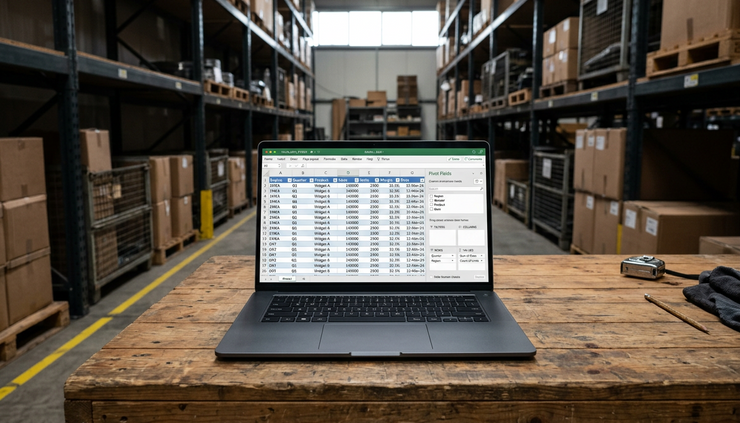
A new approach to sales system reporting
In traditional reporting systems, users often follow the same routine. They open a predefined report, select the available filters and review the results. If they need a different layout, they usually ask an administrator, IT department or system provider.
This approach makes sense for standard reports used daily or monthly, such as overall sales summaries, representative rankings or order lists. The problem arises when the question is more specific.
For example:
which products particular customers bought during a selected period,
how sales by manufacturer changed month by month,
which product categories grew at a particular distributor,
sales value across retail chains,
product quantities ordered by customer and period.
These questions do not always justify a separate system report. They are often working analyses driven by the situation. A sales manager may need them before a team discussion. A sales director may use them to review terms with a manufacturer. A system administrator may prepare a data breakdown for several departments.
Z24 Analyzer was created for exactly these situations.
Analyze Z24 data beyond a fixed report layout
The workflow is simple. Users export sales data from Z24 as an Excel `.xlsx` file, then open it in Z24 Analyzer for Windows. They can then build complete pivot analyses themselves.
The application lets users drag fields between four areas:
rows,
columns,
values,
filters.
This way of working is familiar to anyone who uses pivot tables. The difference is that the tool is designed for Z24 data and analysis of field sales, business partners, products, orders and representatives.
Users decide how to build the view. They can put representatives in rows, months in columns and sales value in the values area. They can replace representatives with manufacturers, add a product category filter or focus on a selected retail chain.
This means a report becomes more than a static document: it becomes a way of working with data.
One data source, many possible questions
Sales rarely fits into a single report. The same data export can answer many questions when users have a tool that lets them freely rearrange the analysis.
In Z24 Analyzer, users can prepare views in seconds, including:
sales by representative and month,
sales by manufacturer,
products purchased by individual customers,
sales by product category,
sales by distributor,
sales value by retail chain,
product quantities by customer and period,
any other breakdown supported by the available data.
In practice, sales analysis can start with a simple question and develop in new directions. If sales to a customer are falling, users can quickly identify the products involved. If a manufacturer's performance weakens in a particular month, they can explore representatives, distributors or categories.
This is especially valuable when a decision cannot wait for a new report. The data is already available; only the perspective changes.
A saved analysis layout becomes your own report
The key feature of Z24 Analyzer is not simply arranging a table. Many analytics tools offer that. What matters most is the ability to save prepared analysis layouts.
Users do not have to start from an empty view each time. They can create their own analysis, save the layout and reuse it with the next Z24 data export.
This significantly changes everyday work. A pivot table prepared once effectively becomes a personal report. It does not have to be commissioned, specified, implemented and maintained as a separate system component. It is created where the analytical need arises.
For businesses, this means greater flexibility. For administrators, fewer requests for small report variations. For sales managers, faster answers. For representatives, a better understanding of their performance, customers and products.
Users are not limited to questions anticipated by the system. They can build their own views whenever a decision requires them.
Z24 Analyzer complements reports in the portal
Z24 Analyzer complements the reports available in the portal. Predefined sales reports remain the best solution for regular, recurring needs. System reports organize key information, while browser-based analysis allows quick checks without installing another application.
The new tool meets a different need: flexible work with exported data, custom breakdowns and layouts saved for future use.
The distinction is straightforward:
Z24 Portal
Z24 Analyzer for Windows
Standard reports, online analysis and everyday work in the system
Custom analysis layouts, `.xlsx` files and fast pivot reporting
Together, they provide a more complete approach to data. As an SFA solution for sales representatives, Z24 manages sales processes, visits, business partners, products and orders. Analyzer extends this with flexible sales analytics beyond the standard report set.
Less waiting, more independent analysis
In many organizations, sales reporting connects several roles. Managers need answers, administrators manage configuration, executives track results, and representatives want to understand their field activity. Each may have different questions about the same data.
Z24 Analyzer shortens the path from question to answer. Instead of creating report variations for every scenario, businesses can provide the data and let users build the view they need.
This does not mean giving up control of the data. Z24 remains the source. Exports come from the system that organizes sales, customer, product, visit and order information. What changes is the workflow after export: users get a tool to analyze data in the layout that best answers their current question.

Custom reports without rebuilding them every time
The greatest value appears after several uses. Users prepare a layout once, save it and return to it with fresh data. The work shifts from repeating the same steps to comparing results.
This is particularly useful for periodic analysis. A business reviewing sales by manufacturer and representative every month can save that layout. Teams regularly analyzing products bought by key customers can recreate the same view with each new export.
Z24 Analyzer combines two qualities that are often difficult to balance: freedom to create custom views and a repeatable reporting workflow.
Z24 Analyzer makes working with data more flexible
This addition to the Z24 ecosystem is more than another feature. It extends the approach to sales data. A report can be a custom analysis layout saved by a user and available whenever needed, as well as a predefined view.
For businesses, this means greater independence when working with data. Sales teams can understand performance better. Administrators need fewer report variations for individual needs. Sales leaders can answer questions that are difficult to anticipate when designing a standard report.
Z24 Analyzer gives users a simple but valuable capability: view data their own way, save that approach and return to it for the next analysis. In sales, that flexibility often determines whether data is merely a record of results or a practical aid to decisions.


Comments